10.2 broke chronyd service

Upgraded a server to 10.2 tonight. Afer the update chronyd service would not start.

May 27 21:38:06 ns.example.com chronyd[957]: chronyd exiting
May 27 21:38:07 ns.example.com chronyd[2954405]: chronyd version 4.8 starting (+CMDMON +REFCLOCK +RTC +PRIVDROP +SCFILTER +SIGND +NTS +SECHASH +IPV6 +>
May 27 21:38:07 ns.example.com chronyd[2954405]: Frequency 13.706 +/- 0.099 ppm read from /var/lib/chrony/drift
May 27 21:38:07 ns.example.com chronyd[2954405]: Loaded seccomp filter (level 2)
May 27 21:38:12 ns.example.com chronyd[2954405]: Selected source 108.61.73.243 (1.time.constant.com)
May 27 21:39:37 ns.example.com systemd[1]: chronyd.service: start operation timed out. Terminating.
May 27 21:39:37 ns.example.com chronyd[2954405]: chronyd exiting
May 27 21:39:37 ns.example.com systemd[1]: chronyd.service: Failed with result ‘timeout’.

The only way I could get it to start was to add
Type=simple
to the service override.

Never had a core service like that fail on OS upgrade so concerned and wanting the correct fix, feel like my fix is a bandaid.

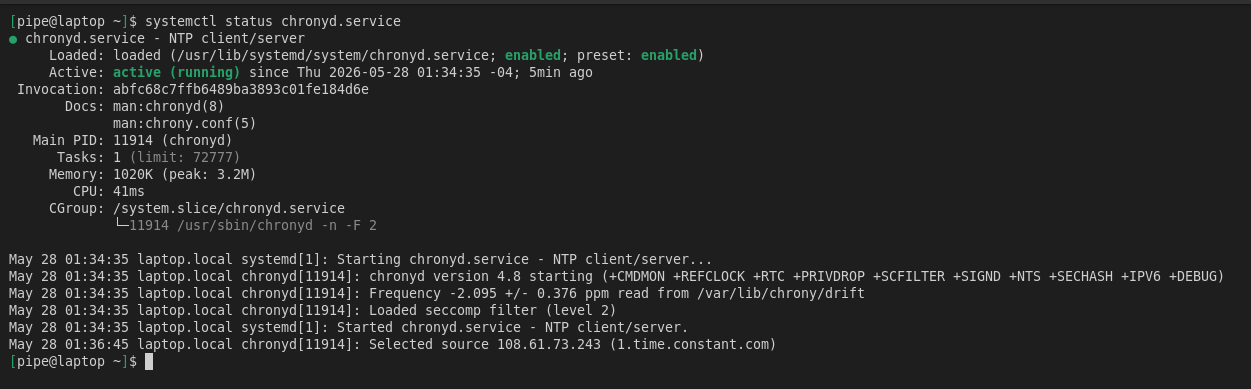
I’m not seeing this behavior on my system. This is with the stock configuration (no changes made to /etc/chrony.conf). I see in your log you have a different source selected (default is pool 2.almalinux.pool.ntp.org). Are there are other changes you have made to the chrony configuration?

[root@ipa01 ~]# cat /etc/os-release
NAME="AlmaLinux"
VERSION="10.2 (Lavender Lion)"
RELEASE_TYPE=stable
ID="almalinux"
ID_LIKE="rhel centos fedora"
VERSION_ID="10.2"
PLATFORM_ID="platform:el10"
PRETTY_NAME="AlmaLinux 10.2 (Lavender Lion)"
ANSI_COLOR="0;34"
LOGO="fedora-logo-icon"
CPE_NAME="cpe:/o:almalinux:almalinux:10.2"
HOME_URL="https://almalinux.org/"
DOCUMENTATION_URL="https://wiki.almalinux.org/"
VENDOR_NAME="AlmaLinux"
VENDOR_URL="https://almalinux.org/"
BUG_REPORT_URL="https://bugs.almalinux.org/"

ALMALINUX_MANTISBT_PROJECT="AlmaLinux-10"
ALMALINUX_MANTISBT_PROJECT_VERSION="10.2"
REDHAT_SUPPORT_PRODUCT="AlmaLinux"
REDHAT_SUPPORT_PRODUCT_VERSION="10.2"
SUPPORT_END=2035-06-01
[root@ipa01 ~]# systemctl status chronyd
● chronyd.service - NTP client/server
     Loaded: loaded (/usr/lib/systemd/system/chronyd.service; enabled; preset: enabled)
     Active: active (running) since Tue 2026-05-26 21:06:46 MST; 24h ago
 Invocation: 5c5a9ba54fe24506a7ad5eae6f287074
       Docs: man:chronyd(8)
             man:chrony.conf(5)
   Main PID: 1103 (chronyd)
      Tasks: 1 (limit: 48401)
     Memory: 4.8M (peak: 5.3M)
        CPU: 167ms
     CGroup: /system.slice/chronyd.service
             └─1103 /usr/sbin/chronyd -n -F 2

May 26 21:06:46 ipa01.clockwork.host chronyd[1103]: chronyd version 4.8 starting (+CMDMON +REFCLOCK +RTC +PRIVDROP +SCFILTER +SIGND +NTS +SECHASH +IPV6 +DEBUG)
May 26 21:06:46 ipa01.clockwork.host chronyd[1103]: Frequency -28.561 +/- 0.151 ppm read from /var/lib/chrony/drift
May 26 21:06:46 ipa01.clockwork.host chronyd[1103]: Loaded seccomp filter (level 2)
May 26 21:06:46 ipa01.clockwork.host systemd[1]: Started chronyd.service - NTP client/server.
May 26 21:08:19 ipa01.clockwork.host chronyd[1103]: Selected source 2600:3c02:e000:bc::123:0 (2.almalinux.pool.ntp.org)
May 26 21:08:19 ipa01.clockwork.host chronyd[1103]: System clock wrong by 2.110115 seconds
May 26 21:08:22 ipa01.clockwork.host chronyd[1103]: System clock was stepped by 2.110115 seconds
May 26 21:08:24 ipa01.clockwork.host chronyd[1103]: Selected source 2602:80b:5000::36 (2.almalinux.pool.ntp.org)
May 26 21:09:28 ipa01.clockwork.host chronyd[1103]: Selected source 2001:418:8405:4002::13 (2.almalinux.pool.ntp.org)
May 26 21:11:37 ipa01.clockwork.host chronyd[1103]: Selected source 2602:80b:5000::36 (2.almalinux.pool.ntp.org)
Hint: Some lines were ellipsized, use -l to show in full.
1 Like

Hi,

I upgraded my laptop to 10.2 too. I’m using the default config and just added your server for test and the service its running ok

Perhaps if you share your config file we could see something else.

1 Like

I did have one thing set in systemctl override:
ExecStart=
ExecStart=/usr/sbin/chronyd -4 $OPTIONS

   -4
       With this option hostnames will be resolved only to IPv4 addresses and only IPv4 sockets will be created.

When I removed that (commented out) it is happy again.

Did I add that option incorrectly? Maye the -4 option casues some kind of systemd anomaly. It seems to be timing out when notifying systemd.

Thank you all for having a look.

I think everything is stock now, with the -4 option removed.

[root ~]$ systemctl cat chronyd.service

/usr/lib/systemd/system/chronyd.service

[Unit]
Description=NTP client/server
Documentation=man:chronyd(8) man:chrony.conf(5)
After=ntpdate.service sntp.service ntpd.service
Conflicts=ntpd.service systemd-timesyncd.service
ConditionCapability=CAP_SYS_TIME

[Service]
Type=notify
PIDFile=/run/chrony/chronyd.pid
Environment=“OPTIONS=”
EnvironmentFile=-/etc/sysconfig/chronyd
ExecStart=/usr/sbin/chronyd -n $OPTIONS

CapabilityBoundingSet=~CAP_AUDIT_CONTROL CAP_AUDIT_READ CAP_AUDIT_WRITE
CapabilityBoundingSet=~CAP_BLOCK_SUSPEND CAP_KILL CAP_LEASE CAP_LINUX_IMMUTABLE
CapabilityBoundingSet=~CAP_MAC_ADMIN CAP_MAC_OVERRIDE CAP_MKNOD CAP_SYS_ADMIN
CapabilityBoundingSet=~CAP_SYS_BOOT CAP_SYS_CHROOT CAP_SYS_MODULE CAP_SYS_PACCT
CapabilityBoundingSet=~CAP_SYS_PTRACE CAP_SYS_RAWIO CAP_SYS_TTY_CONFIG CAP_WAKE_ALARM
DeviceAllow=char-pps rw
DeviceAllow=char-ptp rw
DeviceAllow=char-rtc rw
DevicePolicy=closed
LockPersonality=yes
MemoryDenyWriteExecute=yes
NoNewPrivileges=yes
PrivateTmp=yes
ProtectControlGroups=yes
ProtectHome=yes
ProtectHostname=yes
ProtectKernelLogs=yes
ProtectKernelModules=yes
ProtectKernelTunables=yes
ProtectProc=invisible
ProtectSystem=strict
ReadWritePaths=/run /var/lib/chrony -/var/log
RestrictAddressFamilies=AF_INET AF_INET6 AF_UNIX
RestrictNamespaces=yes
RestrictSUIDSGID=yes
SystemCallArchitectures=native
SystemCallFilter=~@cpu-emulation @debug @module @mount @obsolete @raw-io @reboot @swap

Adjust restrictions for /usr/sbin/sendmail (mailonchange directive)

NoNewPrivileges=no
ReadWritePaths=-/var/spool
RestrictAddressFamilies=AF_NETLINK

[Install]
WantedBy=multi-user.target

/etc/systemd/system/chronyd.service.d/override.conf
(all commented out)


$ grep -Ev ‘[1]*(#|$)’ /etc/chrony.conf
sourcedir /run/chrony-dhcp
driftfile /var/lib/chrony/drift
makestep 1.0 3
rtcsync
ntsdumpdir /var/lib/chrony
logdir /var/log/chrony
server ``1.time.constant.com`` iburst
server ``2.time.constant.com`` iburst
server ``3.time.constant.com`` iburst


  1. [:space:] ↩︎

The unit executes /usr/sbin/chronyd -n $OPTIONS

The OPTIONS comes from:

Environment="OPTIONS="
EnvironmentFile=-/etc/sysconfig/chronyd

That is, from file /etc/sysconfig/chronyd, which has:

# Command-line options for chronyd
OPTIONS="-F 2"

You could modify that file into:

# Command-line options for chronyd
OPTIONS="-F 2 -4"

and check whether the service fails to start again.

2 Likes

There might be your problem.

Unless you set the service to type=oneshot you can only have one ExecStart, remove the first empty ExecStart in your override dropin and try again.

Unless Type= is oneshot, exactly one command must be given. When Type=oneshot is used, this setting may be used multiple times to define multiple commands to execute.

I don’t think you need the empty one to reset if that is the reason you have it there, I think the dropin will override the original ExecStart

2 Likes

That is why it was there. But it won’t start with the one line either:
”Unit chronyd.service has a bad unit file setting”

Thank you. I wondered where that was. I added -4 there as suggested and restarted, it seems happy. But I can’t see that it “took”

May 28 22:48:10 tn3 chronyd[4792]: chronyd version 4.8 starting (+CMDMON +REFCLOCK +RTC +PRIVDROP +SCFILTER +SIGND +NTS +SECHASH +IPV6 +DEBUG)
May 28 22:48:10 tn3 chronyd[4792]: Frequency 13.611 +/- 0.028 ppm read from /var/lib/chrony/drift
May 28 22:48:10 tn3 chronyd[4792]: Loaded seccomp filter (level 2)
May 28 22:48:14 tn3 chronyd[4792]: Selected source 108.61.73.243 (1.time.constant.com)

I found it:

[root@tn3 /var/log]$ ps -ef | grep chronyd
chrony 5064 1 0 22:56 ? 00:00:00 /usr/sbin/chronyd -n -4 -F 2

[root@tn3 /var/log]$ ss -tulpn | grep chronyd
udp UNCONN 0 0 127.0.0.1:323 0.0.0.0:* users:((“chronyd”,pid=5064,fd=4))

Apparently that worked, thank you.

3 Likes

The /etc/sysconfig/ is the place where RHEL has kept (some) config for services for more major versions than I can remember.
They did continue that practice when they shifted to SystemD.
1 Like

Today I learned you need to reset ExecStart in an override, thank you!

I have honestly never changed ExecStart in an override, so thank you for that information!