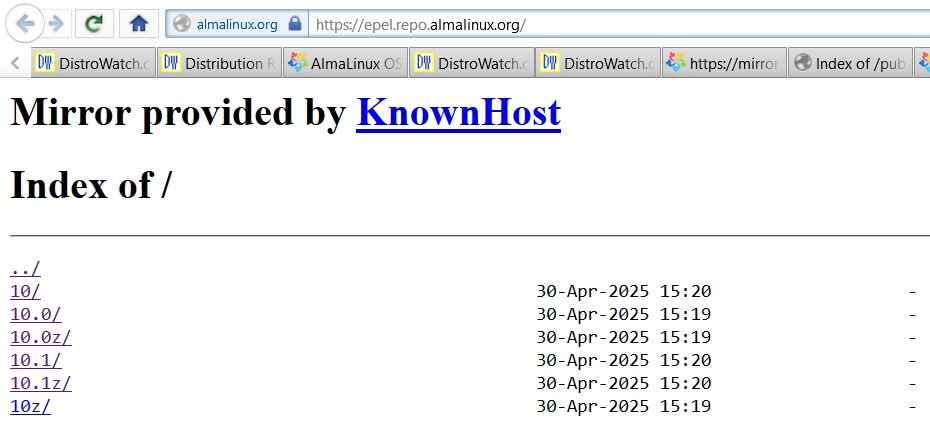
I haven’t seen any definition or explanation regarding the different subdirectories found in the Alma Epel repo…
Can anyone explain what purpose the different directories provide ?
I haven’t seen any definition or explanation regarding the different subdirectories found in the Alma Epel repo…
Can anyone explain what purpose the different directories provide ?
Hi @Yubby!
The subdirectories you’re seeing at https://epel.repo.almalinux.org/ correspond to different versions of AlmaLinux (or compatible RHEL versions) for which EPEL (Extra Packages for Enterprise Linux) provides packages.
Here’s a quick breakdown:
10/ directory but are structured by point release.z usually stands for z-stream updates or snapshots. These often include fast-tracked updates or important backported patches for that specific minor version.In most cases, if your system is set up correctly, it will automatically pull packages from the appropriate directory via your .repo files (usually found in /etc/yum.repos.d/), so you don’t need to manually browse these folders.
All the best! 
Oh queso,
The only repo within the “epel.repo” file that’s ‘enabled’ is:
baseurl=https://epel.repo.almalinux.org/$releasever${releasever_minor:+z}/x86_64_v2/
Which means ???
The variables that dnf have are apparently
{
  "arch": "x86_64",
  "basearch": "x86_64",
  "releasever": "10",
  "releasever_major": "10",
  "releasever_minor": "0",
  "stream": "10-stream"
}
The ${releasever_minor:+z} probably substitutes just like in bash (to ‘z’),
so the baseurl would become:
https://epel.repo.almalinux.org/10z/x86_64_v2/
Looking at the directories on a mirror, the 10, 10.1, and 10.1z seem to have identical timestamp on subdir ‘Everything’.
Likewise, the 10z, 10.0, and 10.0z seem to have identical timestamp on subdir ‘Everything’ (different from the 10.1 one).
I bet that some of them are symlinks to others.
Anyway, the 10z leads probably to packages built for EL 10.0, i.e. the current point release. The 10 leads to packages built for CentOS Stream 10. See EPEL branches :: Fedora Docs
If the ‘10z’ is a symlink to ‘10.0’ (or ‘10.0z’), then it probably changes to point to ‘10.1’ (or ‘10.1z’) when EL 10.1 is released (just like symlink ‘10’ will update on AlmaLinux mirrors to point to ‘10.1’ on release of AlmaLinux 10.1). That way we don’t have to update the AlmaLinux or EPEL repo config on our systems after each point update.
You can always check with repoinfo what urls it is using:
# dnf repoinfo epel
...
Repo-id            : epel
Repo-name          : Extra Packages for Enterprise Linux 10 - x86_64
Repo-status        : enabled
Repo-revision      : 1753921804
Repo-updated       : Thu 31 Jul 2025 02:30:16 AM CEST
Repo-pkgs          : 17,676
Repo-available-pkgs: 17,676
Repo-size          : 16 G
Repo-metalink      : https://mirrors.fedoraproject.org/metalink?repo=epel-z-10&arch=x86_64
  Updated          : Thu 31 Jul 2025 06:28:18 AM CEST
Repo-baseurl       : rsync://fedora.tu-chemnitz.de/ftp/pub/linux/fedora-epel/10.0/Everything/x86_64/ (57 more)
Repo-expire        : 86,400 second(s) (last: Thu 31 Jul 2025 06:28:18 AM CEST)
Repo-filename      : /etc/yum.repos.d/epel.repo
Total packages: 17,676
Note that the x86_64_v2 does not use fedoraproject’s mirrors. Its repoinfo has:
Repo-id       : epel
Repo-name     : Extra Packages for Enterprise Linux 10 from AlmaLinux - x86_64_v2
Repo-baseurl  : https://epel.repo.almalinux.org/10z/x86_64_v2/
Note also that the tu-chemnitz baseurl that you did get is probably picked from the data that you get from the:
https://mirrors.fedoraproject.org/metalink?repo=epel-z-10&arch=x86_64
I just wrote how someone can find the urls dnf is using. There is no need to start digging into where variables are defined and how they are expanded (unless you want to build your own repo with your own urls…)
recently tried to do a dnf update and got the following error whilie searching for the appstream.:
curl error (6) could not resolve hostname for https://mirrors.almalinux.org.
I’m having to use the x86_64_v2 release (very old cpu). was able to update before but now… not so much.
I did some checking and I came across the suggestion of changing the path in repo url to: https://mirrors.almalinux.org/mirrorlist/$releasever${releasever_minor:+z}/x86_64_v2/
but still no luck
any pointers to a new direction would be welcome
thanks
Try setting a public DNS in /etc/resolv.conf (e.g., 1.1.1.1 or 8.8.8.8) and check if you can ping mirrors.almalinux.org.
If your CPU doesn’t support x86_64_v2, edit your .repo files to use x86_64 instead, then run:
bash
sudo dnf clean all && sudo dnf makecache
Your machine fails to resolve the name mirrors.almalinux.org into IP address.
That is a network issue (or network config issue).
If the CPU “does not support x86_64_v2”, then it lacks instructions like SSE4.
The AlmaLinux 10 “x86_64” requires x86_64_v3 – more than x86_64_v2.
Switching AlmaLinux 10 x86_64_v2 system to use x86_64_v3 packages will definitely fail.
I know I’m using the _v2 version of alma. I did that deliberately since my cpu does not support v3 instruction set. I was able to get updates, install and config xrdp using repos at first.
Then… then I started messing around with firewalld. I’m pretty sure now that is where I’ve messed up… I can ping my local gateway but not my public ip. I’m using the machine as an internal router between my local production network and a playground network (wlan connects to production, ethernet to the new stub).
On an earlier release I got everything working great. my proxmox was getting updates, I had set up ip_forwarding correctly and had 2 working zones. So, I know it can be done. I think I just messed up the firewalld config.
I started playing directly with nft, then changing what zone I wanted each interface to be in… long story short… I think it’s definitely a network firewall config issue and the source of the error was yours truly.
time to rip it out and start again…
Thanks for the suggestions, it helped me work through the problem…I think