i have tried to update 2 systems running on fairly old hardware, one centos 7.9 homeserver to alma 8 and the other alma 8.10 (initially being prepared unsuccessfully to replace the centos) to alma 9
both appeared to work correctly all the way through, but on reboot still show the original os version, as far as i can tell the grub has not been updated in either
is this a fixable issue, can the grub be updated manually, or some other option
can either of these be repaired or do they need to be fresh installed
the centos system is still running withot issues at this stage but needs to be updated to a supported os
[quote=“westconn, post:1, topic:5305, full:true”]
i have tried to update 2 systems running on fairly old hardware, one centos 7.9 homeserver to alma 8 and the other alma 8.10 (initially being prepared unsuccessfully to replace the centos) to alma 9
both appeared to work correctly all the way through, but on reboot still show the original os version, as far as i can tell the grub has not been updated in either
is this a fixable issue, can the grub be updated manually, or some other option
can either of these be repaired or do they need to be fresh installed
the centos system is still running withot issues at this stage but needs to be updated to a supported os
on further research it would appear that python 2.7 is causing a problem, but on googling it seems that python can not be removed without breaking the system
I am not sure that dnf and some other installed packages may provide alternative to make it possible to uninstall the python
I have the same issue on a fresh image server with Plesk and AlmaLinux 9. I am trying to upgrade to AL 10 but it won’t boot to the update os. I ran precheck and solved all issues and inhibitors. Update completes successfully and says to reboot to continue. Reboot just loads the AL 9.6 OS and not the installer. I re-ran and re-checked everything and all seems ok.
I ran GRUBBY and it shows it at index 4 but the console doesn’t show it on boot up.
Do I need to update the Grub configuration? Is the Plesk panel controlling things and not allowing the installer to boot? I am not a server guru so I am out of my depth with this.
You already have the ELevate-Upgrade-Initramfs entry in GRUB.
Just boot that entry (select it in GRUB, or run grubby --set-default-title "ELevate-Upgrade-Initramfs" && reboot)
Could you run these and share the output?
ls -1 /boot/loader/entries
grep -n “ELevate-Upgrade-Initramfs” /boot/loader/entries/*.conf
findmnt /boot /boot/efi
lsblk -fp
sudo sed -n ‘1,120p’ /boot/efi/EFI/almalinux/grub.cfg
The grep and findmnt returned nothing. Last command directory doesn’t exist.
Hope you see this edit. This system won’t let me have more than 3 replies so I have to edit my final allowed one.
Title exists so I will try rebuilding GRUB:
[root@7528B12 ~]# cat /boot/loader/entries/b1a2bbbb09c84f648f1412e3e8f69029-upgrade.x86_64.conf
title ELevate-Upgrade-Initramfs
version upgrade.x86_64
linux /vmlinuz-upgrade.x86_64
initrd /initramfs-upgrade.x86_64.img
options root=/dev/mapper/vg00-root ro resume=/dev/mapper/vg00-swap rd.lvm.lv=vg00/root rd.lvm.lv=vg00/swap console=ttyS0,57600 console=tty0 net.ifnames=0 biosdevname=0 crashkernel=1G-4G:192M,4G-64G:256M,64G-:512M enforcing=0 plymouth.enable=0 rd.plymouth=0
id almalinux-0-upgrade.x86_64
grub_users $grub_users
grub_arg --unrestricted
grub_class kernel
[root@7528B12 ~]#
Rebuilt GRUB:
[root@7528B12 ~]# sudo grub2-mkconfig -o /boot/grub2/grub.cfg
Generating grub configuration file ...
Found linux image: /boot/vmlinuz-upgrade.x86_64
Found initrd image: /boot/initramfs-upgrade.x86_64.img
Found linux image: /boot/vmlinuz-5.14.0-570.44.1.el9_6.x86_64
Found initrd image: /boot/initramfs-5.14.0-570.44.1.el9_6.x86_64.img
Found linux image: /boot/vmlinuz-5.14.0-503.38.1.el9_5.x86_64
Found initrd image: /boot/initramfs-5.14.0-503.38.1.el9_5.x86_64.img
Found linux image: /boot/vmlinuz-5.14.0-503.34.1.el9_5.x86_64
Found initrd image: /boot/initramfs-5.14.0-503.34.1.el9_5.x86_64.img
Found linux image: /boot/vmlinuz-0-rescue-b1a2bbbb09c84f648f1412e3e8f69029
Found initrd image: /boot/initramfs-0-rescue-b1a2bbbb09c84f648f1412e3e8f69029.img
Adding boot menu entry for UEFI Firmware Settings ...
done
[root@7528B12 ~]#
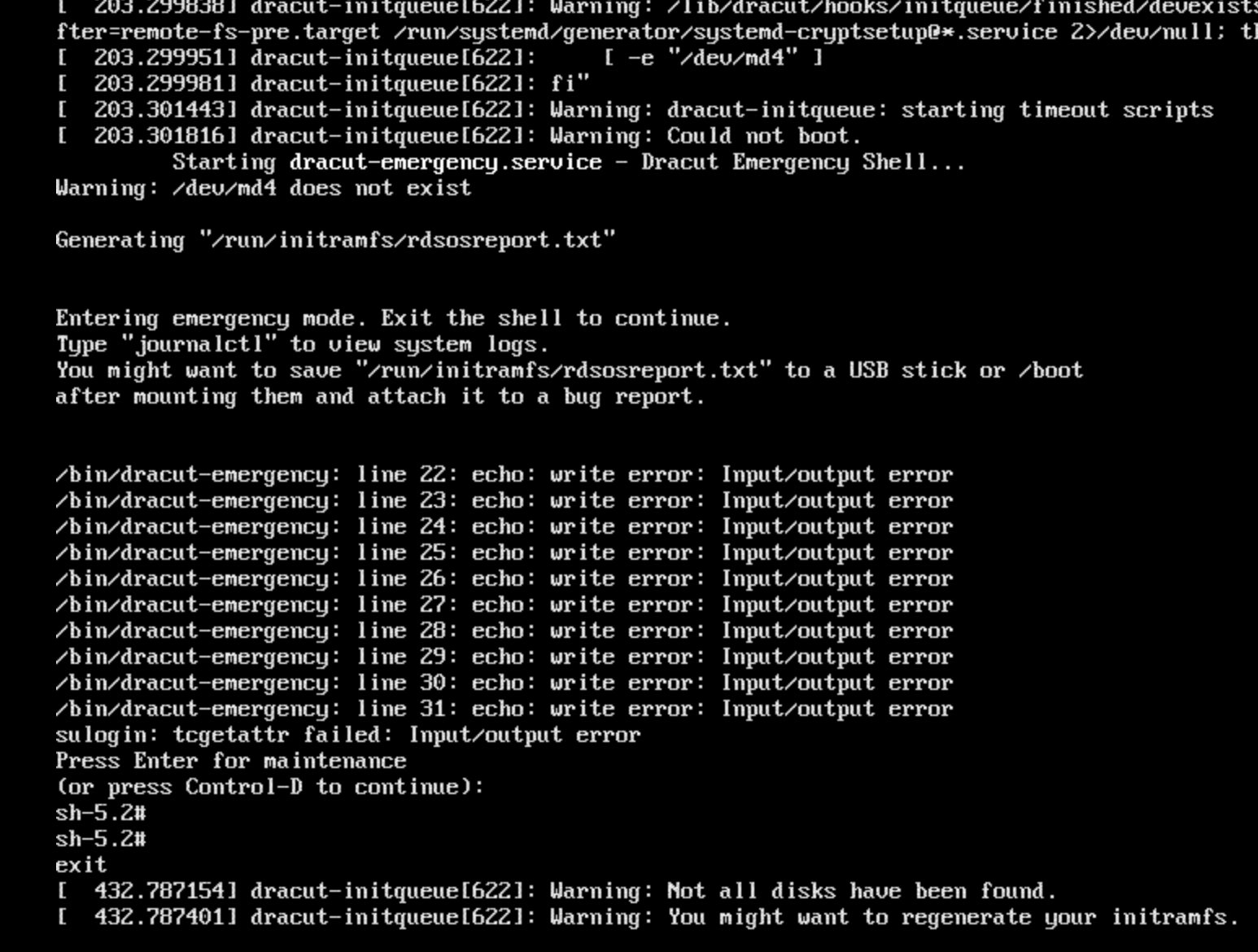
Reboot successfully started the upgrade and then everything went sideways. Lots of errors during the process and then it ended with this:
Back to update via edit because of this policy of only 3 replies:
Looks like the updater trashed everything. I can’t boot into any kernel because it can’t find eth0 (Leapp upgrade to AL 10 doesn’t allow kernel-assigned naming and I had to rename eth0 & eth1 in /etc/systemd/network/70-default0.link and then change the .nmconnection files for each to remove that inhibitor.)
I’m afraid I will have to give up and re-image back to the Ionos Plesk / AlmaLinux 9 and live with that for a few years. I am very disappointed I couldn’t get an in-place upgrade to AlmaLinux 10 and am pretty sure it is either Plesk or the original image package by Ionos that is messing it up. They say they won’t have an image available for Plesk/AlmaLinux 10 until May 2026 or later so that isn’t an option. I could try to just wipe it all and do a fresh AL 10 installation and then add Plesk, but all of the convenience of the ready-made image would be gone and I actually need to get this server up and running in this lifetime.
Sorry, I didn’t notice your full reply before. I see now that the ELevate entry does boot, but then dracut drops you into the emergency, did you try ? :
sudo dracut -f /boot/initramfs-upgrade.x86_64.img /boot/vmlinuz-upgrade.x86_64
reboot
If it still fails, you may need to add rd.md.uuid or rd.lvm.lv
Totally understandable — hosted images with Plesk are heavily customized, and that’s exactly the kind of setup where in-place upgrades usually fail.
Re-imaging back to the official AlmaLinux 9 + Plesk image from Ionos is the safest choice to get a stable system quickly.
If later you do want AlmaLinux 10 sooner than Ionos provides it, the only reliable path would be a clean AL10 install and then adding Plesk manually — but I agree that’s extra work compared to their pre-built image.
Thanks for sharing your experience, it will definitely help others in the same situation.
I’ve earned the next level so I can post a reply, yea!
In a final twist, I went to re-image and they have just added AlmaLinux 10 with Plesk image. Must have been getting pressure from customers because they told me May 2026. All of the last two weeks of agony could have been avoided if they had been accurate in the timeline. Oh well. I sure added to my server admin knowledge!
I re-imaged with AL 10 and it went fine. However, when I did a dnf update and it updated to the latest kernel there was a repo error. Upon reboot, kernel panic and the server is dead. Had to re-image back again but can’t do a dnf update of the kernel again for fear of bricking the thing. I am going to open a new topic with the details and this new issue. I already hijacked the thread, I don’t want to now make it weave all over the place.