HDMI Display Issue with Ryzen Embedded 8845HS on AlmaLinux 10

Dear All,

I have a drive with AlmaLinux 10 installed that runs successfully on an AMD Ryzen Embedded V2748 APU, displaying GUI in FullHD mode. However, when I simply replace the V2748 with a Ryzen Embedded 8845HS, the HDMI display output stops during the system boot process.

Based on the attached boot log, it appears that the display output may halt when the system switches from general VGA mode to GPU-accelerated mode. Since the GPU core in the V2748 (Vega architecture) differs from that in the 8845HS (RDNA 3 architecture), I suspect that missing firmware for RDNA 3 might be causing this issue.

If my assumption is correct, could you please advise how I can manually install the appropriate firmware files? Have the necessary firmware files for RDNA 3 already been released?

Best regards,
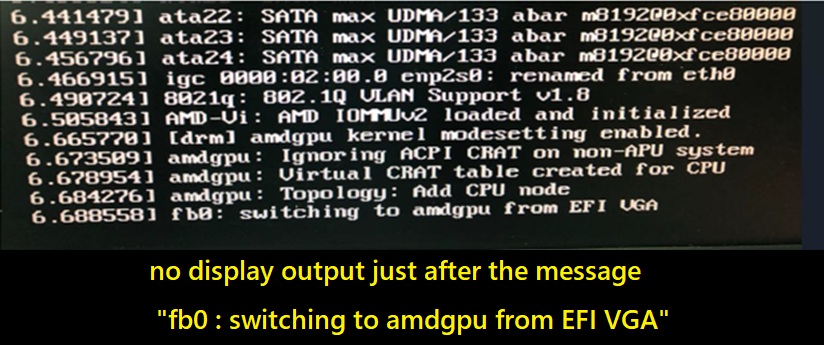
Hi @HiroAtech!

Let’s tackle the problem step by step. After logging in, please check if you have any messages like “amdgpu: failed”.

journalctl -b -k | egrep -i 'amdgpu|firmware|fb0|drm'
rpm -q linux-firmware
ls /lib/firmware/amdgpu | egrep 'gc_11_0|gfx11|psp_13|smu_13' | head
lsinitrd /boot/initramfs-$(uname -r).img | egrep 'amdgpu|gc_11_0|gfx11'

If it appears, it is exactly the problem of missing firmware in initramfs. In this case, a small update is needed, therefore:

sudo dnf upgrade --refresh -y
sudo dnf install -y kernel kernel-core kernel-modules kernel-modules-extra linux-firmware mesa-dri-drivers

Rebuild initramfs and reboot:
sudo dracut -f --kver "$(uname -r)"

All the best! :v:

Hi @Fekthis

Thank you very much for your advice. I will take the steps.

Regards,