Hello all I need same help ,
I need to update the kernel on Alma, how can I do that?
Hello all I need same help ,
I need to update the kernel on Alma, how can I do that?
sudo dnf up gives you the latest available kernel.
You have to reboot the system to start using it.
How can I install a specific kernel like 6.12.0-124.31.1.el10_1.x86_64
when I make command sudo dnf install kernel-6.12.0-124.31.1.el10_1.x86_64 appears these information sudo dnf install kernel-6.12.0-124.31.1.el10_1.x86_64
Last metadata expiration check: 0:19:27 on Tue June 16, 2026 15:29:00 EDT.
No argument match: kernel-6.12.0-124.31.1.el10_1.x86_64
Error: Could not find match: kernel-6.12.0-124.31.1.el10_1.x86_64.\
I need to install dahdi communication.
You would likely need to use the vault to get the old kernels since those are from 10.1. There has to be a good reason to do this as 10.2 is the current release and 6.12.0-211.22.1.el10_2 for example is available.
I would not recommend installing an older 10.1 kernel unless there is a very specific and well-tested reason to do so.
Older kernels may be missing security fixes that are included in the current AlmaLinux 10.2 kernel stream. Kernel updates often include fixes for local privilege escalation issues, so downgrading or pinning an older kernel can increase security risk.
For DAHDI, I think it would be better to first check whether it can be built or installed against the currently supported AlmaLinux 10.2 kernel, for example by using a matching kmod/DKMS package, rather than installing an older kernel from Vault.
dnf list --showduplicates kernel
does list all the versions of package ‘kernel’ that the repository has.
The support for all the el10_1 content did end the moment the el10_2 was released.
You definitely want to update your third-party content to function with current kernel,
rather than freeze your system to old, unsupported kernel version, whose vulnerabilities are increasingly known.
I agree with redadmin & jlehtone - it’s much better to build the DADHI drivers for the current Kernel (and keep doing so via e.g. DMKS so it stays updated).
You’ll need the “kernel-devel” package for the headers required, and you should be able to follow the process described at GitHub - asterisk/dahdi-linux: This is the official dahdi-linux repository. All issues and PR should be raised here. · GitHub
I noticed there’s an additional git repository at GitHub - asterisk/dahdi-linux-complete · GitHub which includes additional tooling, and includes some additional details about dependencies required on “Redhat” compatible systems, which might help you.
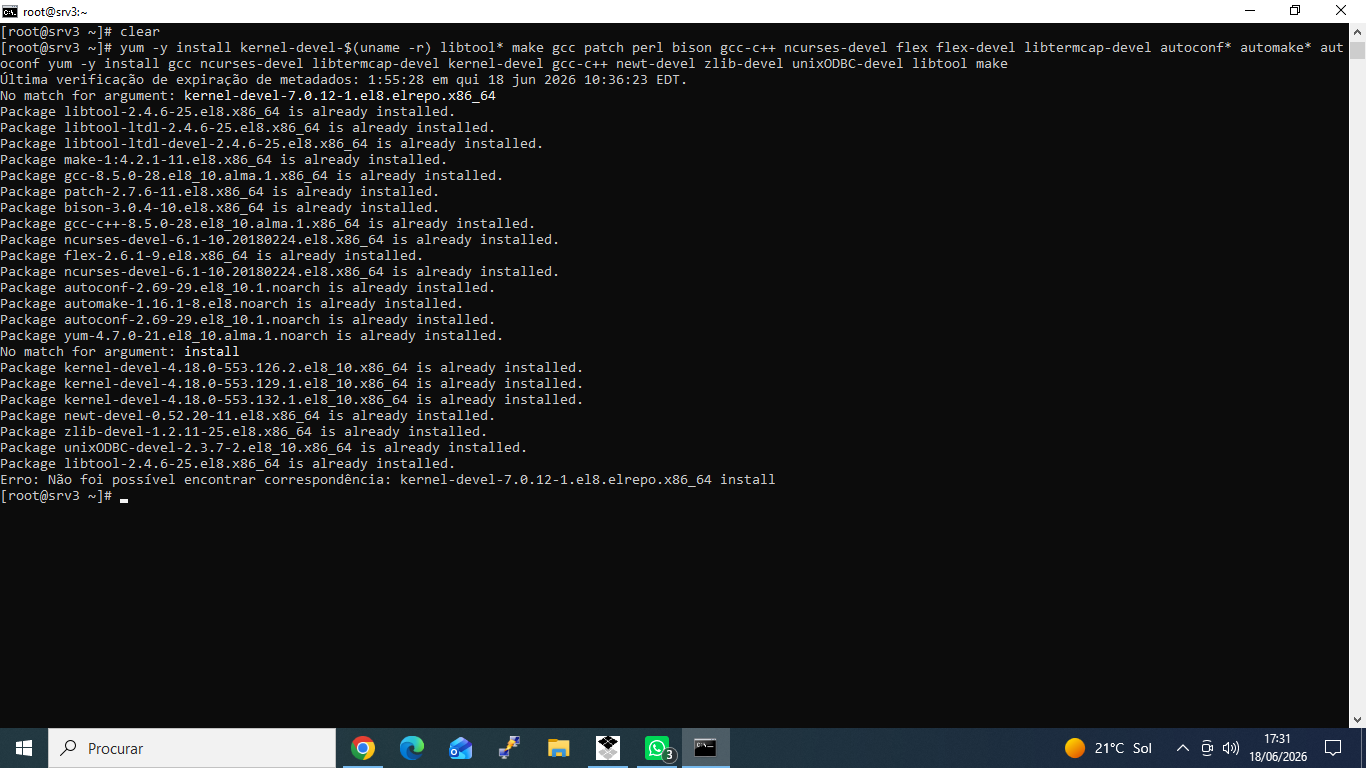
When I try to install the dependencies, this happens. In moment I use Linux 7.0.12-1.el8.elrepo.x86_64
A kernel built by ELRepo for AlmaLinux 8?
First, that is not an “AlmaLinux kernel”. Issues with are yours to solve (with ELRepo).
You should ask them where their kernel-devel packages are.
Why did you ask about a kernel for AlmaLinux 10? You seem to have AlmaLinux 8 system.
Hi, i dont understand anything.
Can you send the output of this command?
head -2 /etc/os-release
uname -r
rpm -qa | grep kernel-core
Ok, then you are in AlmaLinux 8.
This is what I would do:
First: Change the kernel, i would use the 4.18.0-553.134.1.el8_10.x86_64 (the last for AL8)
Second: try again using @lozenge ‘s instructions
Note: EPEL 8 has:
Available Packages
dahdi-tools.x86_64                    2.11.1-16.el8              epel
dahdi-tools-devel.x86_64              2.11.1-16.el8              epel
dahdi-tools-libs.x86_64               2.11.1-16.el8              epel
(But I have no idea how they relate to dahdi.)
I noticed the current release is 3.4 …
OP would need to check release notes and change logs for any vulnerabilities that may be patched or if desired features were added.
I doubt much has actually changed in terms of what a Telco sends over a compatible PRI over the years, but I haven’t been involved with that stuff for way too long to be sure.
Is there a page I can follow to install this kernel?
It’s already installed. You just need to select it when you restart your system.