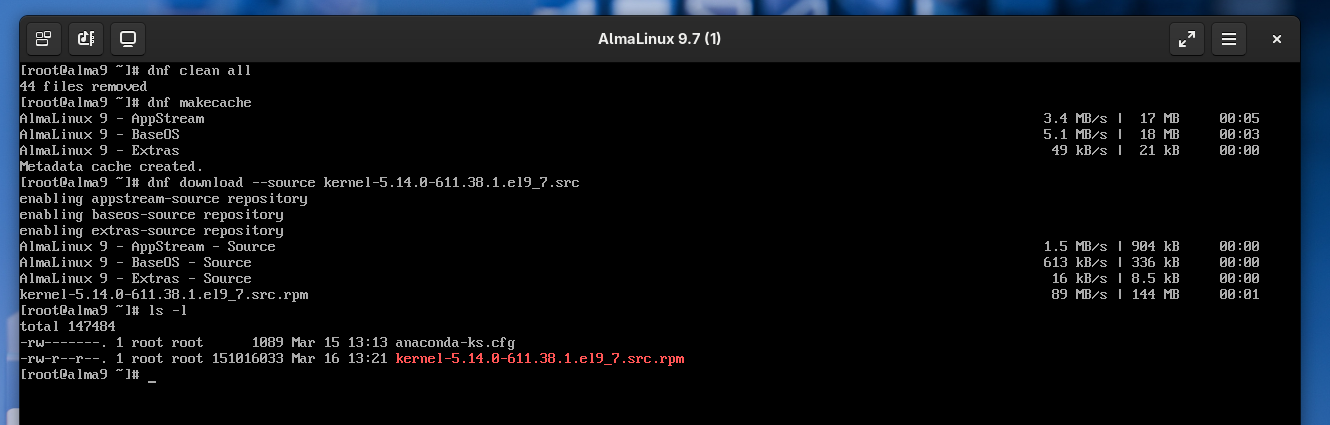
For a custom module build, I need to download the most recent kernel source package, i.e., I run dnf download --source kernel-5.14.0-611.38.1.el9_7.src, but it fails with the following error:
[MIRROR] kernel-5.14.0-611.38.1.el9_7.src.rpm: Status code: 404 for http://vault.almalinux.org/9.7/BaseOS/Source/Packages/kernel-5.14.0-611.38.1.el9_7.src.rpm (IP: 2a04:4e42:8d::820)
[MIRROR] kernel-5.14.0-611.38.1.el9_7.src.rpm: Status code: 404 for http://vault.almalinux.org/9.7/BaseOS/Source/Packages/kernel-5.14.0-611.38.1.el9_7.src.rpm (IP: 2a04:4e42:8d::820)
[MIRROR] kernel-5.14.0-611.38.1.el9_7.src.rpm: Status code: 404 for http://vault.almalinux.org/9.7/BaseOS/Source/Packages/kernel-5.14.0-611.38.1.el9_7.src.rpm (IP: 2a04:4e42:8d::820)
[MIRROR] kernel-5.14.0-611.38.1.el9_7.src.rpm: Status code: 404 for http://vault.almalinux.org/9.7/BaseOS/Source/Packages/kernel-5.14.0-611.38.1.el9_7.src.rpm (IP: 2a04:4e42:8d::820)
[FAILED] kernel-5.14.0-611.38.1.el9_7.src.rpm: No more mirrors to try - All mirrors were already tried without success
I find this very odd because it works for older versions, such as kernel-5.14.0-611.36.1.el9_7.src. When I manually browse the repo under Index of /9.7/BaseOS/Source/Packages/ , I can see the package should be available for download, but when I click it, I get the same 404 error DNF is getting. When I go through Index of /9/BaseOS/Source/Packages/ though, I CAN actually download it, but that is not the path DNF gets from the mirrorlist.
For me, this looks like a weird bug on the server side. Can someone confirm?
If it is a problem on my end somehow, could you point me to a better way to download the kernel sources? The process I’m using this for is supposed to run automatically, so I don’t want to manually check the repo every time.
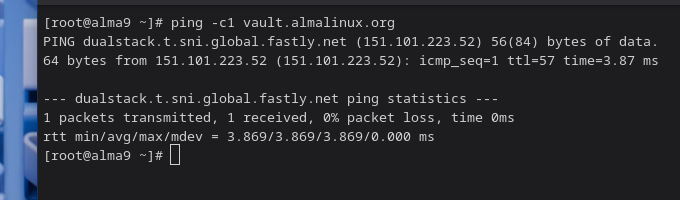
When I run ping -c1 vault.almalinux.org on the machine in question, I get
PING vault.almalinux.org(2a04:4e42:8d::820 (2a04:4e42:8d::820)) 56 data bytes
64 bytes from 2a04:4e42:8d::820 (2a04:4e42:8d::820): icmp_seq=1 ttl=58 time=3.96 ms

--- vault.almalinux.org ping statistics ---
1 packets transmitted, 1 received, 0% packet loss, time 0ms
rtt min/avg/max/mdev = 3.955/3.955/3.955/0.000 ms
I also tried the dnf download command again, but it still doesn’t work.
Here is another interesting observation, though: I’m working from home today, and when I run the same command locally on my machine, I get
PING vault.almalinux.org (2a04:4e42:6f::820) 56 data bytes
64 bytes from vault.almalinux.org (2a04:4e42:6f::820): icmp_seq=1 ttl=59 time=21.9 ms

--- vault.almalinux.org ping statistics ---
1 packets transmitted, 1 received, 0% packet loss, time 0ms
rtt min/avg/max/mdev = 21.908/21.908/21.908/0.000 ms
and I can actually download the package! So to me, it looks like the server the machines at my workplace use doesn’t have the package, while the one I get at home does (and I guess the one you’re connecting to does, too).
tl;dr: It looks to me like the servers under 2a04:4e42:6f::820 and 151.101.223.52 have the package, while 2a04:4e42:8d::820 does not. I would think this is an error. Could someone confirm?
Thanks, I appreciate your input. However, after further testing, I don’t think it is likely to be a problem with my corporate network.
I tested around on different machines, among them the machine in question, my work machine (which is on the same network, but different subnet) and my computer at home (which is on a different network entirely). I wanted to find out more about the download behaviour.
From pipe’s answers and my tests, I know four different addresses a nameserver may return for vault.almalinux.org: 2a04:4e42:8d::820 (the one my server defaults to), 2a04:4e42:6f::820 (the one my machine at home defaults to), 151.101.223.52 (from pipe), 146.75.119.52 (the one my server defaults to when I force IPv4).
For my test, I forced each machine to use the different addresses by adding
<ip_address> vault.almalinux.org
to my /etc/hosts.
What I found is that all the machines I tried this on behaved the same and as follows:
Tried to download…
kernel-5.14.0-611.38.1.el9_7.src
kernel-5.14.0-611.36.1.el9_7.src
from 2a04:4e42:8d::820
doesn’t work (error 404)
works
from 2a04:4e42:6f::820
works
works
from 151.101.223.52
works
works
from 146.75.119.52
doesn’t work (error 404)
works
Of course, this isn’t conclusive since I couldn’t test it from more than two locations on my end. But I can download something on every machine I’ve tried from every server, just not always the particular package I’m interested in, and nothing changes between machines on my end. This leads me to believe there’s something up on the server side.
Anyway, this kinda gave me a solution: Fix the IP to one of the working ones as I did for the experiment. I just don’t find it particularly nice. If anyone is interested in recreating my little experiment, I’d be happy to know how it went for you.