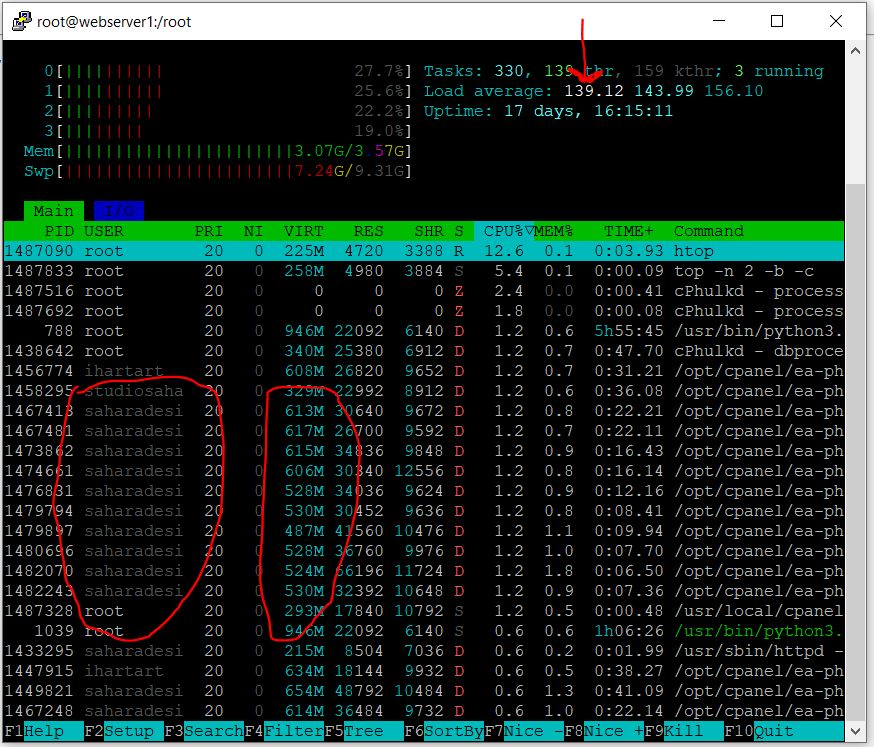
Hi. I’m running a web hosting platform on an AlmaLinux 9 server. The issue is that, ever so often, the resources of the server become externally taxed, and I haven’t been able to locate the root cause yet - as things I’ve suspected might be the cause were not
As such, in the meantime, to make sure the server isn’t down for too long—as I’m not monitoring it 24/7—I’m looking for a script that will run in the background of the server and reboot it when it reaches a certain CPU threshold.
Can anyone assist with this? Thank you.
Hello,
Instead of using a script,
how about using the systemd API to restrict resources in the kernel cgroup?
For example, httpd
- Edit override.conf
[root@alma9 redadmin]# systemctl edit httpd
Editing /etc/systemd/system/httpd.service.d/override.conf
Anything between here and the comment below will become the new contents of the file
[Service]
CPUQuota=50% ←enter
MemoryMax=2G ←enter
Lines below this comment will be discarded
- Apply settings
sudo systemctl daemon-reload
sudo systemctl restart httpd
Thank you for responding. Unfortunately, my understanding of Linux is lacking, and as such, I don’t know what such a change would do to cPanel. My plan is just to apply a simple reboot patch until I can find a qualified Linux administrator to go in and inspect the system.
This is a simple Bash script that monitors the CPU usage of the server and automatically reboots the system when it exceeds a set threshold (e.g., 95%).
Save this script as high_cpu_reboot.sh, set it to be executable, and then run it in the background using the root user or sudo.
The script is as follows. Please verify it for safety.
#!/bin/bash

THRESHOLD=95
INTERVAL=60

while true; do
    LOAD=$(awk '{print $1}' /proc/loadavg)
    CPU=$(nproc)
    LOAD_PERCENT=$(echo "$LOAD $CPU" | awk '{printf "%.0f", ($1/$2)*100}' )
    if [ "$LOAD_PERCENT" -ge "$THRESHOLD" ]; then
        /sbin/reboot
        exit
    fi
    sleep $INTERVAL
done
Thank you, one question, is the 95 example you have in THRESHOLD=95, the load average?
So, looking at the attached image, the load average is 139.12. If I set THRESHOLD=139.12 in the script will reboot the server?
Yes, that’s correct.
If you set THRESHOLD=139.12 in your script, and the server’s load average reaches or exceeds 139.12 (as shown in your screenshot), then the script will trigger a reboot.
However, please note that such a high load average usually indicates a severe problem (for example, runaway processes or resource exhaustion). It’s a good idea to also check what is causing the high load before relying solely on automatic reboots.
If you want the script to act at a lower threshold, you can adjust the value accordingly.
1 Like
“However, please note that such a high load average usually indicates a severe problem (for example, runaway processes or resource exhaustion). It’s a good idea to also check what is causing the high load before relying solely on automatic reboots.”
I agree. Is there a simply way of checking what it could be? When I run htop it gives me a list of what’s running and the stats, but it doesn’t indicate what the root cause of the issue could be?
You’re right—htop shows what’s currently running, but it doesn’t always reveal the root cause of high load.
To investigate further, you may need to use additional tools (like iostat, iotop, or check system logs) depending on whether the issue is CPU, disk, or something else.
Hi @Omniaxis!
From what I can see, you already have a script to help you, so I’ll give you some commands you can use if you want to analyze it piece by piece. First of all, I recommend that you have 2GB of swap memory for the 4GB of RAM, and if you have hibernation turned on, up to 6GB.
1. Spot the “hot” processes
ps aux --sort=-%cpu | head -n 10
ps aux --sort=-%mem | head -n 10
2. I/O bottlenecks
sudo dnf install sysstat
iostat -xz 1 5
sudo dnf install iotop
sudo iotop -ao
All the best!