Howdy Gang,
Alma 9.6
I use xfsdump to do my backups to an external disk. I do a full (level 0) on Saturday and then incrementals the rest of the days through Friday. This has been working OK for years.
Starting in ~first week of December my incrementals began to be quite large, almost half the size of the full so the external disk became filled up by ~Wednesday. This is all on a stationary server on which I’m the only user and I don’t actually do anything there most of the time. It just serves up some web pages and has my IMAP mail tree. So it is hard to believe that 1/2 of the files there are being modified every day.
I don’t fully understand how Alma9 decides to set the modified flag for a file. Any thoughts as to how to run down what is happening are appreciated.
Alan D.
Hello
Looking at this, I expect that adopting a method to “divide the dump level into something like 0/1/2” would likely resolve the issue. What do you think?
Why the capacity increased is only a hypothesis, and I can only think of ways to suppress the cause.
Thank you
Thank you redadmin, good thought. I did go in and check the code and will modify it to keep doing 1,2,3.. type incrementals rather than just repeated #1 type. I don’t know why I didn’t do that in the first place.
However, even the first level 1 is very large, half the size of the full. This started after a dnf upgrade near the first of the month so I was wondering if perhaps something in Alma9 itself had made a change in how files are being marked as modified.
Thanks for the follow-up.
With the limited information available it’s hard to say exactly why the first level-1 became so large, so for now I’d suggest trying the multi-level scheme (0–1–2–3…) we discussed and watching how the sizes change over a few cycles.
If the incrementals are still unusually big after that, please feel free to share your backup script and layout so people here can take a closer look
thank you
I have modified the script and will respond with info after I do some runs with that.
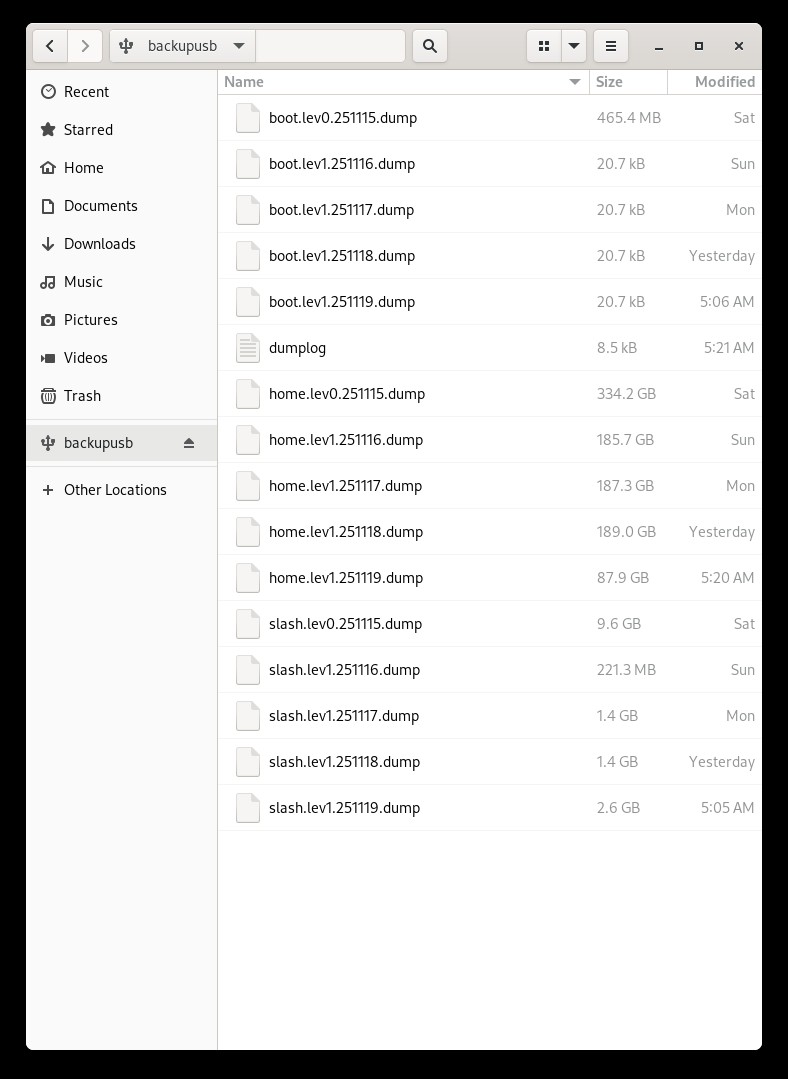
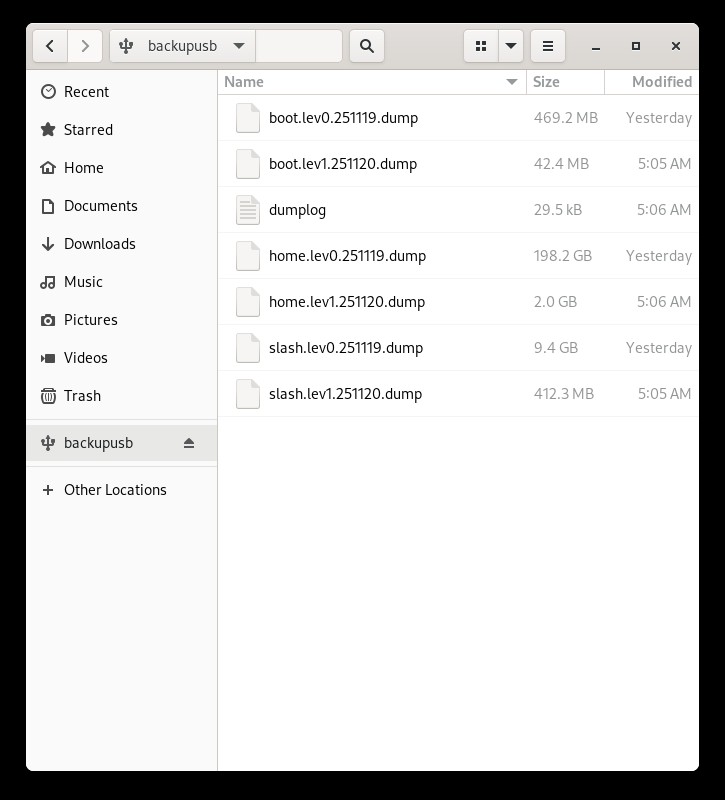
In the mean time, take a look at the two uploaded screen shots. The first is from one of my last backups in October where I was just doing sequential Level 1 backups. Notice how the level 0 ones are largish but the level 1’s are all small, particularly look at the ones for /home. Then compare to screen shot two which is this weeks using the same script where the backup disk space ran out last night/this-morning (Tues backup). Again look at how large the incrementals are for /home!
I claim that something changed in how Alma9 is marking files as modified. There is no reason why the incrementals should be so large. I am using the same script for both of these runs so it isn’t a code problem per se, although I do need to clean it up and use better level control.
More details after I run the modified script, but that doesn’t change the fact that there is something wrong in how files are being marked as modified
Hello,
Looking at your screenshots, the backups for /boot and / behave as expected: all of the level-1 dumps there are small. The only strange part is /home, where each level-1 dump is around 180–190 GB (about half the size of the full), which does seem unusually large.
From xfsdump’s point of view, this suggests that something under /home is causing many files to be seen as “changed” since the last dump. If you don’t mind, could you check that side (applications, services, or any large jobs touching /home) to see if anything might be updating a lot of files between runs?
Thank you.
I did check as best I could for applications/programs that run on the sever that might write to the /home are. There really isn’t anything there that has changed other than maybe some system files and my IMAP tree, the server is very stable only being a server for my web site which is static these days.
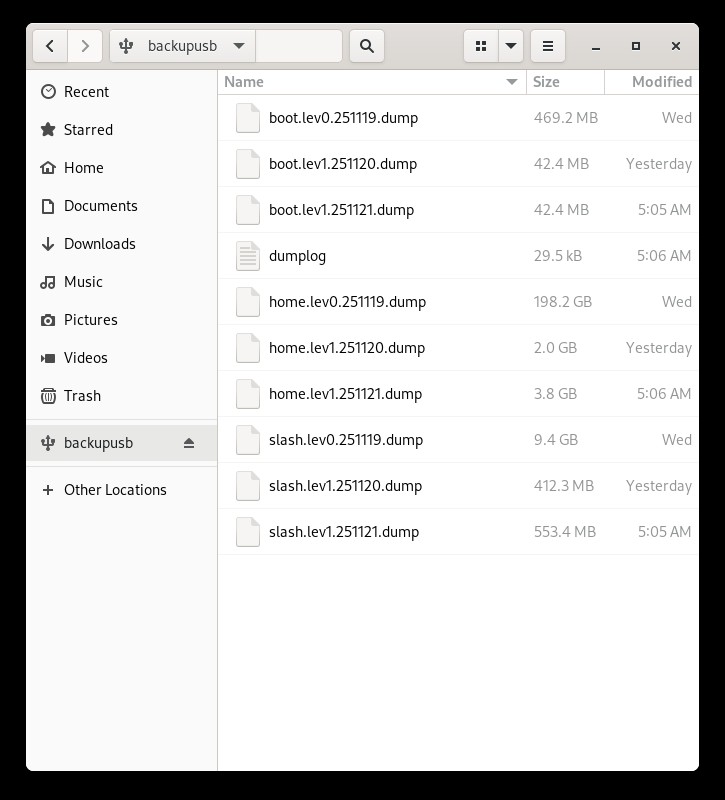
This issue may be moot. On Wednesday there was a rather large update from Alma9 which I ran. (This has caused other problems with MYSQL but not a problem for here.) After I did the update/upgrade I then forced a level zero backup to the same disk you were seeing in Screenshot One. This wrote a lev0 backup for the three partitions. Last night it ran a level 1 backup and the size is again way smaller as it should be. See the attached ScreenShotThree. So maybe the recent upgrade fixed what ever was going on. I’ll watch it for tonight’s backup and see what happens.
Note that I am still running the original script, not my modified one yet. I’ll implement that on Friday.
Glad to hear it may have been resolved after the update and new level-0 backup.
Please let us know how tonight’s backup goes.
It looks like the problem is gone, look at ScreenShotFour and how last night’s size is also small but just a tad larger than the previous level 1. Just as expected. So maybe the last update/upgrade did ‘whatever’ and the flagging of modified files is good again. I will start another complete set of backups on a new external disk tonight and I’ll use my modified script to step through the levels and I’ll report back here as to how that goes. But otherwise for the time being we can consider the problem solved. I’ll wait to mark the thread as solved untill I’m certain.
Hello, Alan D.
I’m very happy to hear that you’re working toward a resolution.
I look forward to hearing good news.
Thank you
It now looks like this problem has resolved itself with another Alma9 upgrade. I am currently running the script with a weekly full followed by separate incrementals from 1-6. This is working well with the /home incrementals down int the megabyte range.
So no real understanding of what was the original problem but it did twig me get the code cleaned up.